


Bus Simulator - Bus Games 3D
4.4962.00 Reviews
App Specs
- Version
- 1.7.0
- Updated On
- License
- Free
- Downloads
- 100,000,000+
- Developer
- Jima Apps
- Categories
- Role Playing
- Platform
- Android
Screenshots
 Analysis by AppCompare
I often think of a bus-driving game as a good shared-device option: one person can take a short turn, then hand the phone or tablet to someone else without needing to follow a long story. Bus Simulator - Bus Games 3D is a free role-playing game from Jima Apps, built around the appeal of driving buses in a city setting. Its broad premise makes it easy to understand at a glance, though a household should still agree on who is using the device and whether anyone plans to make in-app purchases.
A small shared-device routine
Imagine a quiet moment at home when one person wants to try a driving game and another is waiting for a turn. A bus simulator can suit that casual handoff better than a role-playing game that depends heavily on remembering a long chain of story events. I would treat this as an option for taking turns and exploring at one person’s pace, rather than assume the game supports shared progress, separate profiles, or a particular multiplayer arrangement.
That distinction matters on a family phone or tablet. Before passing the device around, decide whose store account is in use and who is allowed to approve purchases. The game is free to download, but it also offers in-app purchases priced from $9.99 to $119.99 per item. Those are meaningful amounts, so I would not leave purchase decisions to a casual tap by a younger player.
Decide the device rules before handing it over
For shared use, I’d make the simple boundaries clear first: whether the device owner is staying nearby, whether purchases are off limits unless an adult agrees, and when the next person gets a turn. These are household arrangements, not special game features, and they help avoid the usual confusion when a game is installed on a device several people use.
If you are choosing a game for your own phone, the practical question is whether a bus-driving theme sounds relaxing or engaging to you. If the device belongs to someone else, check with its owner before installing anything or changing settings. I wouldn’t assume that a game’s free download means every optional part of it is free, especially when in-app purchases are available.
Who is likely to enjoy this kind of game?
I’d put this on the shortlist for someone curious about bus simulators, city driving, or mobile games with a vehicle-focused premise. The store summary points to bus games in 3D and offline driving, which makes the idea appealing to people who want a driving-themed option without needing to make it their main game. It may also suit a player who likes trying a game briefly before deciding whether to spend more time with it.
On the other hand, someone looking for a tightly written role-playing story, deep character development, or a carefully documented simulation may be happier with another choice. The category label alone doesn’t tell you how much role-playing depth to expect, so I’d approach it primarily as a bus-driving game rather than choose it for a complex narrative. Players who dislike optional purchases should also make their spending boundary clear before playing.
Worth Reading Before You Choose

Baby Panda World Brings Quick Play to Modern Phones, but Its Game Library Feels Busy

ESPN’s Live Game View Makes Following Close Games Easier

QuizzLand Review: A Good Fit for Short Trivia Breaks, Not Every Player

Basketball Stars: Multiplayer Is Fast, but Can It Recover When Matches Go Wrong?

WEBTOON Turns Phone Updates Into a Better Reading Routine

Link to Windows Runs on Shared Habits, Not Social Feeds
Age context and trust
The game has a Teen content rating, so I would use that as a starting point when deciding whether it is suitable for a younger member of the household. It is not a substitute for a parent or guardian’s own judgement. A quick check of the game together can help establish whether its presentation and play style feel appropriate for the person using it.
Its popularity may reassure someone who prefers established mobile games: it has an average rating of 4.4 from around 247,000 ratings and more than 100 million installs. Those figures show that many people have tried it, but they do not guarantee that every player will enjoy it or that the experience will match a particular household’s expectations. I’d use them as context, not as a replacement for checking the game yourself.
Getting Behind the Wheel
First things first, downloading Bus Simulator - Bus Games 3D was a breeze. The app is available for both Android and iOS, so whether you're rocking a Samsung or an iPhone, you’re covered. Once installed, I was greeted with a slick interface that made navigating through the options as smooth as a Sunday drive.
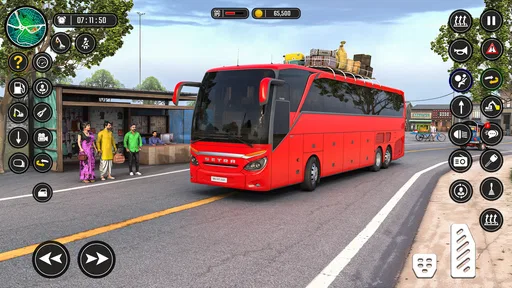
Upon launching the game, you immediately get to choose your bus. Yes, you heard that right. From sleek city buses to rugged countryside coaches, the variety is pretty impressive. Each bus has its own unique handling and features, which adds a nice layer of strategy to the game. Do you want speed, maneuverability, or sheer passenger capacity? Decisions, decisions!
Gameplay and Mechanics
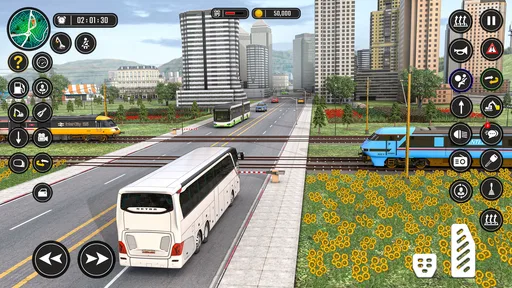
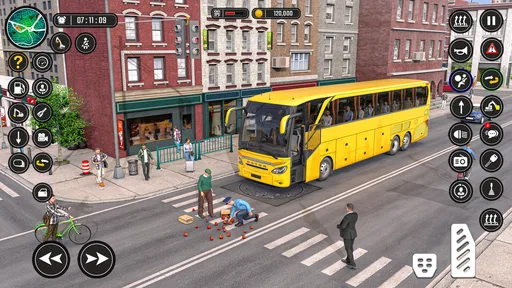
Once I chose my ride, it was time to hit the road. The controls are intuitive, with options for steering wheel, tilt, or arrow keys. I personally went for the steering wheel—it just feels right, you know? The game does a fantastic job of simulating real bus driving conditions. You’ve got traffic signals, pedestrians, and yes, even those pesky speed bumps to deal with.
One of the coolest features is the realistic traffic system. I had to be on my toes, watching out for other vehicles and making sure I didn’t miss any stops. The passengers have places to be, after all! The attention to detail here is top-notch, making the driving experience both challenging and rewarding.
Graphics and Sound
Okay, let’s talk about the eye candy. The graphics in this game are pretty darn impressive for a mobile app. The cityscapes are vibrant and detailed, and the day-night cycle adds a whole new level of immersion. Driving through the city at night, with streetlights illuminating the path, is surprisingly soothing.
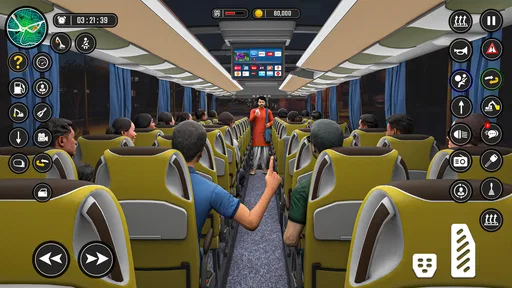
The sound design complements the visuals perfectly. From the hum of the engine to the chatter of passengers, every sound adds to the realism. I even found myself getting a bit too comfortable, forgetting that I was supposed to be dropping off passengers and not just joyriding through the city.
Leveling Up and Challenges
As you progress, you earn money and experience points, which can be used to unlock new buses and upgrade existing ones. There are various missions and challenges that keep the gameplay fresh. Whether it’s navigating through a storm or dealing with a particularly tricky route, there’s always something new to tackle.
The game also features a multiplayer mode, which I found to be a nice touch. Competing against friends or other players around the globe adds an extra layer of fun. Who knew bus driving could be so competitive?
What to consider before installing
For an everyday decision, I would first ask what the player wants from a mobile driving game. If they mainly want to explore a bus-themed experience, the premise may be enough to make this an easy pick. If they expect the precision of a dedicated vehicle simulator, a story-heavy role-playing game, or a competitive game with clearly defined online play, I would compare alternatives in those specific niches instead of assuming this title covers all of them equally well.
The game is free, but that does not make the optional spending irrelevant. I’d treat the listed purchase range as a reason to set expectations early, especially on a shared device. Agreeing that purchases need the account holder’s approval is a more useful safeguard than relying on a child to infer the difference between trying a free game and spending money within it.
For a player who wants to use the game offline, the store summary specifically describes offline driving. That makes it a potential fit when a connection is inconvenient, though I would avoid assuming that every part of the experience works offline. If offline access is the deciding factor, check what is available after installation before planning a long stretch of play around it.
Version and device fit
The current version is 1.7.0, and the minimum operating system listed is Android 6.0. That gives Android owners a concrete compatibility point to check before downloading. The game is also described as available for iOS, but I’d still check the relevant store page on the actual device rather than assume every older phone or tablet can run it smoothly.
One practical tip for shared devices is to let the owner install and open the game first, then hand it over only after checking that it launches and that everyone understands the purchase boundary. This avoids turning the first shared session into troubleshooting or an unexpected spending decision. If the device is used by several people, agree whether progress is simply being played in turn; don’t promise separate saves or accounts unless you have confirmed them in the game.
Choosing between bus games and other mobile options
Compared with a conventional role-playing game, this title’s bus-driving identity is the main draw: it gives the player a vehicle-centered activity rather than asking them to choose it for an elaborate plot. Compared with a general driving game, its focus on buses and city-coach simulation is what makes it distinctive. That focus will appeal to someone who enjoys the idea of handling a larger vehicle and serving passengers, but it won’t necessarily satisfy someone who wants racing, open-ended car customization, or a realistic professional training tool.
For younger players, I would make the choice together rather than treat the high install count as a recommendation by itself. The Teen rating and the optional purchase range are the two clearest points to discuss. For adults sharing a device, the same conversation can be brief: who owns the account, whether purchases are allowed, and whether the game is being played casually or as a longer-term hobby.
Jima Apps’ game is free to try, and its 4.4 average rating suggests broad appeal, but my recommendation depends on the player’s expectations. It makes most sense for someone attracted to bus driving and willing to explore the game on its own terms. I’d skip it if the priority is a clearly verified set of advanced simulation systems, deep role-playing, or a household setup with separate player accounts and purchase controls built into the game.
Final Thoughts
In conclusion, Bus Simulator - Bus Games 3D is a surprisingly engaging and immersive experience. Whether you’re a fan of simulation games or just looking for something new to try, this app is definitely worth a download. It’s got the right mix of challenge, strategy, and just plain fun.
So, if you’re ready to take the wheel and embark on your own bus driving adventure, you know what to do. Just remember to keep an eye on the road and enjoy the ride!
For a household, I’d call it a sensible try when someone genuinely likes the bus theme, the device owner is comfortable with the purchase options, and the Teen rating fits the player. The game is free to install, supports an offline-driving pitch, and has a large audience, but those points don’t make it the right fit for every shared phone or every kind of player. Settle the account and spending boundaries first, then decide whether its particular take on bus driving earns a place in your game rotation.
Pros
- Realistic graphics enhance gameplay immersion.
- Variety of buses to choose from adds diversity.
- Detailed cityscapes provide a rich environment.
- Intuitive controls make driving accessible.
- Regular updates keep content fresh.
Cons
- In-app purchases can be quite pricey.
- Occasional lag on older devices.
- Limited customization for buses.
- Repetitive missions may feel monotonous.
- Ads can disrupt the gaming experience.
FAQs for Bus Simulator - Bus Games 3D
What is the main objective of Bus Simulator - Bus Games 3D?
Bus Simulator - Bus Games 3D aims to provide a realistic bus driving experience. Players can transport passengers across various cityscapes and rural settings, navigating through traffic and adhering to traffic rules. The game focuses on delivering a lifelike simulation of public transport operations, complete with challenges like weather conditions and time constraints.
Does Bus Simulator - Bus Games 3D require an internet connection to play?
Bus Simulator - Bus Games 3D primarily offers offline gameplay, allowing users to enjoy the core simulation features without an internet connection. However, certain features, such as updates or leaderboards, may require internet access. It's advisable to check the app's specific requirements on your device's app store for the most accurate information.
What are the system requirements for Bus Simulator - Bus Games 3D?
The game is designed to run on most modern Android and iOS devices. However, for optimal performance, a device with at least 2GB of RAM and a recent operating system version is recommended. Check the app store listing for specific device compatibility and ensure you have enough storage space for the download and updates.
Are there in-app purchases in Bus Simulator - Bus Games 3D?
Yes, Bus Simulator - Bus Games 3D includes in-app purchases. These can enhance the gaming experience by unlocking new buses, customizations, and additional routes. While the game is free to download, some features and content may require payment. Players can enjoy the game without purchases, but progress might be slower.
How realistic is the driving experience in Bus Simulator - Bus Games 3D?
Bus Simulator - Bus Games 3D is praised for its realistic driving mechanics, including detailed bus models, authentic traffic systems, and dynamic weather conditions. The game simulates real-world driving challenges, such as managing fuel, adhering to schedules, and ensuring passenger safety, providing an immersive experience for simulation enthusiasts.


